WorkerWidget
2026 active Visit site →
WorkerWidget
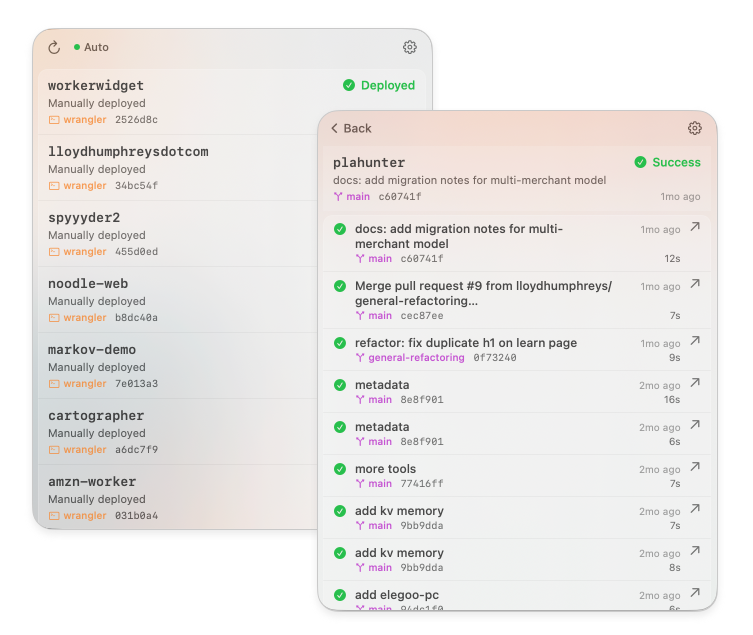
WorkerWidget is a native macOS menu bar app that shows the status of your Cloudflare Workers and Pages builds and deployments without you having to open the Cloudflare dashboard.
Click the cloud icon in your menu bar to see the latest status of all your projects at a glance. Drill into any project for recent builds with commit messages, branches, and build times, then click a build to jump straight to it in the Cloudflare dashboard.
Why does this exist?
I deploy a lot of small things to Cloudflare. Tabbing over to the dashboard just to check whether a build went green got old, so I wanted a glanceable signal in my menu bar — green dot, red dot, done.
- Live build status — Workers (via the Builds API) and Pages projects, side by side
- Click-to-open — jump from a build row straight into the Cloudflare dashboard
- Failure notifications — native macOS notifications when a build breaks
- Auto-updates — via Sparkle, so it stays current without me shipping installers
- Keychain-backed — your API token is stored in the macOS Keychain, not a plist
Built with
WorkerWidget is written in Swift as a native macOS menu bar app. Source is on GitHub under MIT. Not affiliated with Cloudflare — we just really like them.